At the end of last year we went down to London for an HP event. When I was there I was briefed for a big project: a comparative review between two different ways of dealing with the printer ink issue. You know how it is: you run out of ink in the middle of something urgent; your local shop has every printer cartridge in the known universe, except the one you want; and then when you find a shop that stocks the one you want, you wince at the price. Not surprisingly printer manufacturers and ink providers have seen this as an issue that needs addressing and I was asked to try out, alongside each other, two of the options that are out there to address this problem.
Basically, we got sent two printers and the necessary printing supplies to try out the two ink systems including bottles of ink and a year’s worth of Instant Ink. The two were:

Epson L355
The Epson L355 is a wireless all-in-one printer/scanner/copier featuring an integrated ink system, with a purpose-built ink tank which is fully integrated into the printer, and the idea behind it is you can print away without the mess or hassle often associated with non-genuine refills and third-party ink tank systems. It’s expensive at £249.99 RRP (although you can get it for quite a bit less if you shop around), but it does come with quite a quantity of ink. The Epson has rather a boxy, functional look to it I think. Plus you need a bit more height to house it because of the paper guide which sticks up above the printer when you are using it. This is a factor for us because we have sloping ceilings in our office room.

HP ENVY 5540
The HP Envy 5540 has similar functionality with the ability to print, scan and copy, but this one comes as Instant Ink ready and uses traditional cartridges. It’s got a cheaper upfront cost of £76.99 RRP and you pay a monthly fee to use the Instant Ink system if you want to sign up. Our printer came with a 3 month free trial for Instant Ink. I quite like the curved lines of the HP model: it seems more modern and streamlined.
Setting Up
The biggest difference between the two, as regards the set up process, is the different ink systems. Other than that, the two took a roughly similar time to set up allowing for internet connection variability. With the Epson you have to physically pour in ink from the little plastic bottles provided into your ink tanks. This is a process that can leave you worried for your carpets and surfaces, so I’d recommend covering stuff up before starting and wearing gloves (they’ll need to be thin ones if you do) if you are worried about staining your hands. It’s also something that would worry me if we were looking to move the printer for some reason.
One problem we encountered with both printers was that when we were following the recommended or automated set up, it couldn’t connect to our wifi as we have a password and there was no prompt or opportunity to give it. We needed to go through the custom route to allow this. I was surprised that neither printer seemed to allow for a password to be added automatically as I would think most people have a password on their wifi.
Quality
 I printed a recipe off on both printers to have a look at the difference in quality. On the left in the photo is the HP one and on the right is the Epson print. They both produce perfectly adequate (for my purposes) documents, but there’s a noticeably better sharpness about the HP version, which shows up well in the picture of that rather gorgeous cheesecake.
Speed Test
 Next I printed off a picture on photo paper. I used HP Premium Photo Paper for both printers. First I printed a photo using the HP printer. I found it quite a frustrating experience, possibly due to my inexperience of printing photographs off (I usually upload to a site and get them to do it for me). I couldn’t get the photo paper tray to work at all and eventually managed to get the photo paper to feed in through the paper tray. Along the way I managed to print off the picture on an A4 piece of paper (I took the A4 out to start with as directed, but then put a sheet back in when it seemed to object) and I also managed to print off half a picture because I think of not properly aligning things inside the paper tray. Once I’d dealt with these problems though, I quickly (53 seconds) had a very good quality photograph in my hands.
For the Epson my new-found experience was beginning to show and I only had one false start where I printed out the picture on the back of the photo paper rather than the front (this because it wasn’t clear which side needed to be facing when putting the paper into the tray). Once that issue was solved I was able to print off my photo in, but it took a lot longer, in fact over 2 minutes.
For the record I didn’t find either printer had very good instructions for loading printer paper. Both have very small instruction manuals, mostly pictures and not many words, and rely on you using the instructions on the small screen on the printer itself. This works fine for somethings, but it wasn’t so good when loading the paper.
What about result quality? No contest in my view: the HP print is lighter and brighter. Would I have been happy with the Epson quality? Yes, for the most part I was, but some of the shots look a bit too dark, so it would depend on the image I was printing. I’d rather not have that variation to be honest.
Dry Smudge Test
 For this one I printed off a picture on HP All-in-One Printing Paper on both printers using normal print quality. I ran my figures across each one as they came out of the printer to see if the ink smudged at all. Now I had a bit of a game with the HP printer getting the picture to print off in A4 size and I did find the dialogue boxes a bit less instinctive than the Epson, but I managed to get the print I wanted for both in the end. The HP picture came out feeling dry and quality is much sharper than the Epson one. Neither smudged to the touch, but the Epson paper felt damp as it came out and took a few moments to dry. I think it had the potential for smudging and certainly I felt I had to be a bit more careful handling that print because of the dampness.
Water Test
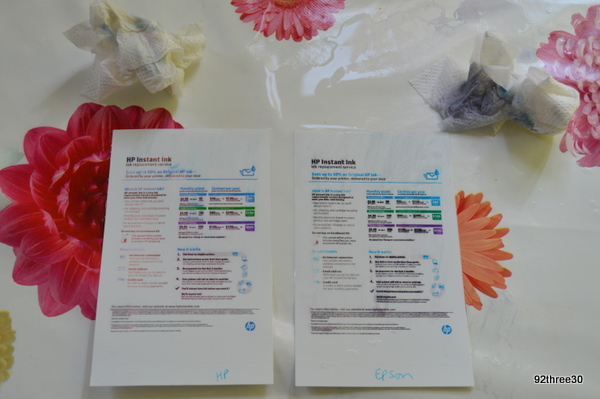 I printed off two pictures using the same paper, one from each picture. Then I deliberately split water on them and rubbed them dry with a paper towel. The ink ran a bit in both cases, but you can see from the picture (and the paper towels) that there was significantly more ink running and smudging on the Epson rather than the HP.
Instant Ink
With Instant Ink you get sent through replacement cartridges in good time for when you need them. We have had our first set through already, but to date we haven’t had to change the cartridges, which is good news. The Instant Ink sends through the usual cartridges that we are used to using in printers and I always feel quite secure about handling them, even over a new carpet. The way the system works when your printer is connected to the internet (after you have set it up, this will be whenever it is switched on), it sends messages to HP telling them how much ink is in the ink cartridges. Based on your usage it is able to predict when you will need the ink. Obviously, they send it out a bit early, just in case you have to do a bigger batch of printing than normal. For £1.99 a month I can print 50 pages a month, which to be honest for us is enough. We mostly print boarding cards as my husband often travels with work (I know you can do this on your phone, but it is handy to have a paper back up) and offers where you need to take the paper copy with you. I sometimes print off papers to work from or agreements to sign or take a photocopy of a document. We have things to print off for school projects and the like for H or even just as a fun activity. Sometimes we go a week without using our printer and other times we will use it every day, but 50 sheets a month seems fine for us on average. Instant Ink allows us to roll over 50 unused prints in any case, so if we use a bit less one month, we can offset it against the next. If 50 pages a month isn’t enough you can upgrade to the next plan or pay for extra sheets as a one-off. You can opt for the 100 sheets a month plan at £3.49 or the 300 sheets a month one costs £7.99. Additional pages can be bought within each plan for £1 (this buys 15 extra sheets on the lower cost plan, but 25 on the higher usage one). There’s no annual fee and it makes no difference if your prints are colour or black and white.
How are we finding it? To be honest it’s very easy. I’m loving that I don’t need to buy cartridges in the shops anymore – I used to carry a card round in my purse with the printer details on, so I don’t need to do that anymore. I haven’t got to worry if the ink is low and H has a school project to finish. It’s taken the hassle out of it for me and £1.99 seems good value compared to how much I was paying for ink cartridges. We always had to have some spares in and we’ve been caught out by printers breaking and having surplus cartridges before now. No worry with this on the Instant Ink plan as I guess you’d just amend your details. The cartridges arrive in a little box that I think would fit through most letter boxes.
Epson EcoTank
Once you get over the initial set up mess worry with the bottles of ink, this is a really easy system to use. With the Epson EcoTank system you get two years worth of ink included with your printer purchase. The amount of ink is supposed to be the equivalent to 72 cartridges. There’s certainly a lot of ink left in my ink tank and I can believe that there is enough for two years. I do have some concerns about the Epson EcoTank system though. I wouldn’t get though 72 cartridges of ink in two years and even though I might complain about the cost of buying cartridges, I’m not sure I’d spend £173 on ink (this figure is the difference in cost between the cost of the two printers) in two years. With HP Instant Ink I am paying £47.76 for two years at £1.99, which is considerably less than £173. On the moderate printing package I’d be paying £83.76 over that same time frame, but on the heavy use plan I’d spend £191.76 so it’s at this point that the Epson system starts to see a price advantage. What I haven’t been able to test in the few months that I’ve had both printers is how the Epson ink lasts over a 2 year time frame, so that is a bit of the unknown.
Comparison
I enjoyed testing out both printers and I’ve been interested to see how two different companies approach the issue of ink costs and convenience. It’s clear from the tests that I’ve done that the HP printing is of a higher standard and I think this is due to the quality of the ink. The ink certainly dried faster from the HP machine and the prints were sharper and clearer. This difference was really clear when printing photos as the HP photos were significantly better. If you print mostly black and white typewritten sheets though, the difference in quality is less marked. I think if you print a lot of sheets (mostly black and white) and you aren’t overly concerned about quality then the Epson EcoTank might be the one to go for. However, for almost everyone else (and I think most families would come into this camp) I’d say the HP Instant Ink system is better. If you print out photos at all (either on photo paper or on ordinary A4 paper) it is much better in quality terms and the costs are considerably lower if you don’t print a lot. Also I found the HP printer was a lot faster for printing pictures, which is something to consider if you print out a lot of photographs.
Update: Instant Ink have now changed their prices and I no longer think it’s as competitive. I used to use the £1.99 plan for 50 pages, but now the price is £2.99 for 50 pages, which is a huge percentage rise. It’s still a fairly small monthly cost I know, but I was only using the full 50 pages very rarely. I’ve now opted for 10 pages for £0.99 a month. 10 pages is a bit restrictive some months, especially if I forget to make sure the print is set to the more appropriate of landscape or portrait orientation. However, because unused prints can be rolled over from previous months, I usually have a bit of leeway. To be honest I’d have preferred 20-30 pages as an option, but you have to jump from 10 to 50 under the current set up.
Further update 2024: Instant Ink have now put their prices up again. I don’t feel it can be recommended anymore as it just isn’t good value for small home users. I am looking into buying another make of printer and will be actively avoiding the subscription model.
Its really interesting to see how the two compare side-by-side, it’s always so confusing choosing a new printer and cost of ink is certainly important.
I have always bought Epson printers, but then used unbranded inks, this really messes up the heads so printers had issues after a while, but being a graphic designer I print lots and I need exact colour likeness from screen to print. This time I went with brother for the larger tanks, I do love my printer but really wish Epson had been doing this a couple of years ago, I would of had one for sure!
As for HP I have a laptop made by them but they do not make large scale printers and in the design world this is a must!
Great review though, interesting to read!
Lots more concerns when you have to have that level of accuracy for work. I hadn’t realised there was so much variety between the various models printer manufacturers offered.
We go through ink like there is no tomorrow in our printers and it’s so expensive to replace too.
We have an HP inkjet 2540 and I love it. Cost me £40 in the sale, total bargain.
Ink can be really expensive though
I’m really surprised in the difference of the colours and sharpness of the prints between the printers. I have hated every printer I have ever owned and usually spend hours and much ink and paper trying to get just one good print!
We haven’t had our printer since we moved house (sorry mum and dad) it is however so big and just for printing pictures it’s not great. These certainly look more compact I also love the idea of being sent ink when mine is running out, nothing worse than coming to do something important and finding out the ink is low and you haven’t got any more.
Thanks for telling review
Looking for a new printer that smaller and better quality than what I have now
Always running out of ink so this is great
I find printers and the ink all so confusing so really interested to read your test here, the differences are really noticeable, I shall have to pay more attention when we next upgrade.
Thanks for the comprehensive review! We always have Epsom printers as they’re relatively inexpensive to run. I love the idea behind instant ink – especially as our daughter is forever printing stuff off when she comes home!
Oh that is very interesting, I have always bought HP but haven’t actually noticed a quality of print issue between my HP’s and the Epson, not that I have done vigorous testing 😉
How interesting. I am going to be doing this review over the next few months and am looking forward to seeing the difference in real life!
I need a new printer,thanks for this review xx
Great comparison.
It’s also worth pointing out that if ever you cancel your monthly subscription, the cartridges you still have are deactivated straight away.
Nice to see the side-by-side photo comparisons. We’re contemplating buying a printer, but we don’t print much so tend to print things at the library at the moment.
wow you can really see the quality difference! I keep meaning to invest in a printer, the time might be nigh!
I think it’s too expensive unless you are a high volume user.
We did this too and I much prefered my HP Envy. I have to say though that we have a newer version ecotank and the picture quality is now much better but I would choose an HP everytime
Brilliant comparison review, we still have a black and white HP and very happy with it as we never print our photos as home but if we were then we would consider a newer model, like the HP Instant Ink system you were mentioning.
I have a Canon printer – it’s spent today telling me it has no ink despite having two full cartridges – driving me crazy!!
Such an in-depth informative review, very helpful when we next need to get ourselves a printer, we were lucky enough to win one recently so not for awhile x
I keep seeing recommendations for HP printers and we are desperately in need of a new one so this was really helpful. Interesting to have the comparison with the Epson as well.
I buy gerneric for 1.99per cart excellent for office work
Great review! I always run out of ink just as I need it so this is awesome!
I would put HP ENVY 5540 at my top choice. £76.99 is almost a cheap deal plus you got 3 months trial for instant tank which makes HP ENVY 5540 the best choice.
Thanks for the detailed review. It’s very helpful.
Thanks for the detailed review. printer ink has always been a problem at the office level.